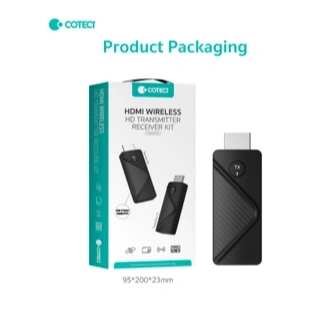
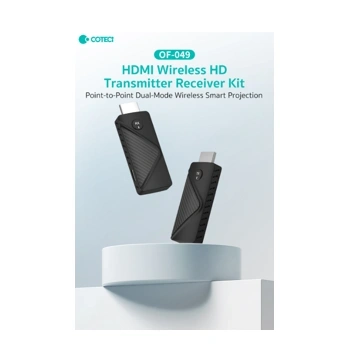
Coteci HDMI Wireless HD Transmitter Receiver Kit – OF-049
0
Shipping is calculated at checkout
Description
Go Wireless. Project Anything. Anywhere — No Cables Needed.
Key Highlights
📡 True Wireless HDMI Transmission — Stream HD video and audio wirelessly without a single cable between devices
🔄 Point-to-Point Dual-Mode Projection — Smart dual-mode system supports both transmitter and receiver in one compact kit
🖥️ Plug & Play Setup — No drivers, no apps, no complex configuration — just plug in and start projecting instantly
📺 Wide Device Compatibility — Works with laptops, PCs, cameras, gaming consoles, projectors, and HDMI-enabled TVs
🔒 Stable Low-Latency Signal — Reliable wireless connection with minimal delay for smooth presentation and media playback
🧳 Ultra Compact & Portable — Slim dongle design fits in your pocket — ideal for office, classroom, and travel use
⚡ Fast & Responsive — Real-time wireless mirroring with high-definition output quality
📦 Complete Kit Included — Comes with both TX (Transmitter) and RX (Receiver) dongles in branded retail packaging
Say goodbye to messy HDMI cables and limited screen setups. The Coteci HDMI Wireless HD Transmitter Receiver Kit (OF-049) lets you wirelessly mirror or extend your screen to any HDMI display in seconds — with zero software installation required.
Designed as a Point-to-Point Dual-Mode Wireless Smart Projection system, the OF-049 kit includes both a transmitter and a receiver dongle. Simply plug the TX dongle into your source device (laptop, camera, or gaming console) and plug the RX dongle into your TV or projector — and your content streams wirelessly at HD quality with stable, low-latency performance.
Whether you're presenting in a meeting room, streaming movies to your TV, or mirroring gameplay on a big screen, this compact kit handles it all without complex setup. The sleek carbon-texture design keeps things professional and portable, making it the go-to wireless display solution for professionals, students, and content creators in Nepal.
Note: Both TX (Transmitter) and RX (Receiver) dongles are included in the box.
Specifications
Feature | Details |
|---|---|
Brand | Coteci |
Model | OF-049 |
Product Type | HDMI Wireless Transmitter & Receiver Kit |
Transmission Type | Point-to-Point Dual-Mode Wireless |
Video Output | HD Wireless Projection |
Connector Type | HDMI |
Kit Contents | 1× TX Dongle + 1× RX Dongle |
Design | Compact Dongle / Stick Form Factor |
Packaging Size | 95 × 200 × 23 mm |
Compatible Sources | Laptop, PC, Camera, Gaming Console |
Compatible Displays | HDMI TV, Monitor, Projector |
Plug & Play | Yes — No Driver or App Required |
Warranty | No Warranty (Accessory Item) |
What's in the Box
1× Coteci Wireless HDMI Transmitter Dongle (TX)
1× Coteci Wireless HDMI Receiver Dongle (RX)
1× Retail Box Packaging
How to Use
Step | Action |
|---|---|
Step 1 | Plug the TX (Transmitter) dongle into the HDMI port of your source device — laptop, PC, camera, or gaming console |
Step 2 | Plug the RX (Receiver) dongle into the HDMI port of your display — TV, monitor, or projector |
Step 3 | Power both dongles via USB (use the device's USB port or a standard USB charger) |
Step 4 | Wait a few seconds for the TX and RX to automatically pair with each other |
Step 5 | Your screen content will now appear wirelessly on the connected display in HD |
💡 Tip: Keep TX and RX within recommended wireless range for the most stable connection. No pairing apps or Bluetooth setup needed.
Where to Use
Location | Use Case |
|---|---|
🏢 Office / Meeting Room | Present slideshows and reports wirelessly from your laptop to the conference room TV or projector |
🎓 Classroom / Training Hall | Teachers can wirelessly mirror lessons from a laptop to a classroom projector without being tethered to a cable |
🏠 Home Entertainment | Stream movies, YouTube, or content from your laptop or PC to your big-screen TV wirelessly |
🎮 Gaming Setup | Mirror or display gameplay from a gaming console to a larger TV or monitor wirelessly |
📸 Photography & Videography | Connect a camera to a TV or monitor for wireless live preview and client review sessions |
✈️ Travel & On-the-Go | Compact enough to carry anywhere — plug into hotel TVs or external displays without needing cables |
🎥 Events & Exhibitions | Display product demos, videos, or presentations on screens wirelessly at trade shows and events |
Compatible With
Source Devices (TX Side):
Laptops, Desktop PCs, MacBooks (via HDMI adapter), DSLR/Mirrorless Cameras, Gaming Consoles (PS4, PS5, Xbox), Streaming Devices
Display Devices (RX Side):
HDMI Smart TVs, LED Monitors, Projectors, Conference Room Displays
Say goodbye to messy HDMI cables and limited screen setups. The Coteci HDMI Wireless HD Transmitter Receiver Kit (OF-049) lets you wirelessly mirror or extend your screen to any HDMI display in seconds — with zero software installation required.
Designed as a Point-to-Point Dual-Mode Wireless Smart Projection system, the OF-049 kit includes both a transmitter and a receiver dongle. Simply plug the TX dongle into your source device (laptop, camera, or gaming console) and plug the RX dongle into your TV or projector — and your content streams wirelessly at HD quality with stable, low-latency performance.
Whether you're presenting in a meeting room, streaming movies to your TV, or mirroring gameplay on a big screen, this compact kit handles it all without complex setup. The sleek carbon-texture design keeps things professional and portable, making it the go-to wireless display solution for professionals, students, and content creators in Nepal.
Note: Both TX (Transmitter) and RX (Receiver) dongles are included in the box.
Specifications
Feature | Details |
|---|---|
Brand | Coteci |
Model | OF-049 |
Product Type | HDMI Wireless Transmitter & Receiver Kit |
Transmission Type | Point-to-Point Dual-Mode Wireless |
Video Output | HD Wireless Projection |
Connector Type | HDMI |
Kit Contents | 1× TX Dongle + 1× RX Dongle |
Design | Compact Dongle / Stick Form Factor |
Packaging Size | 95 × 200 × 23 mm |
Compatible Sources | Laptop, PC, Camera, Gaming Console |
Compatible Displays | HDMI TV, Monitor, Projector |
Plug & Play | Yes — No Driver or App Required |
Warranty | No Warranty (Accessory Item) |
What's in the Box
1× Coteci Wireless HDMI Transmitter Dongle (TX)
1× Coteci Wireless HDMI Receiver Dongle (RX)
1× Retail Box Packaging
How to Use
Step | Action |
|---|---|
Step 1 | Plug the TX (Transmitter) dongle into the HDMI port of your source device — laptop, PC, camera, or gaming console |
Step 2 | Plug the RX (Receiver) dongle into the HDMI port of your display — TV, monitor, or projector |
Step 3 | Power both dongles via USB (use the device's USB port or a standard USB charger) |
Step 4 | Wait a few seconds for the TX and RX to automatically pair with each other |
Step 5 | Your screen content will now appear wirelessly on the connected display in HD |
💡 Tip: Keep TX and RX within recommended wireless range for the most stable connection. No pairing apps or Bluetooth setup needed.
Where to Use
Location | Use Case |
|---|---|
🏢 Office / Meeting Room | Present slideshows and reports wirelessly from your laptop to the conference room TV or projector |
🎓 Classroom / Training Hall | Teachers can wirelessly mirror lessons from a laptop to a classroom projector without being tethered to a cable |
🏠 Home Entertainment | Stream movies, YouTube, or content from your laptop or PC to your big-screen TV wirelessly |
🎮 Gaming Setup | Mirror or display gameplay from a gaming console to a larger TV or monitor wirelessly |
📸 Photography & Videography | Connect a camera to a TV or monitor for wireless live preview and client review sessions |
✈️ Travel & On-the-Go | Compact enough to carry anywhere — plug into hotel TVs or external displays without needing cables |
🎥 Events & Exhibitions | Display product demos, videos, or presentations on screens wirelessly at trade shows and events |
Compatible With
Source Devices (TX Side):
Laptops, Desktop PCs, MacBooks (via HDMI adapter), DSLR/Mirrorless Cameras, Gaming Consoles (PS4, PS5, Xbox), Streaming Devices
Display Devices (RX Side):
HDMI Smart TVs, LED Monitors, Projectors, Conference Room Displays